
For fabricators
Quote metal parts from the CAD file in minutes.
Upload a STEP or DXF and get a priced quote that matches what your laser, press brake and welders will actually do. Built for job shops that quote every day.
Sheet metal quoting software for job shops of 1 to 80 people running laser, plasma, waterjet or press-brake work, where one or two estimators price every enquiry. Estimating and quoting in one step, from the file.
See it work
From part file to priced quote in 90 seconds
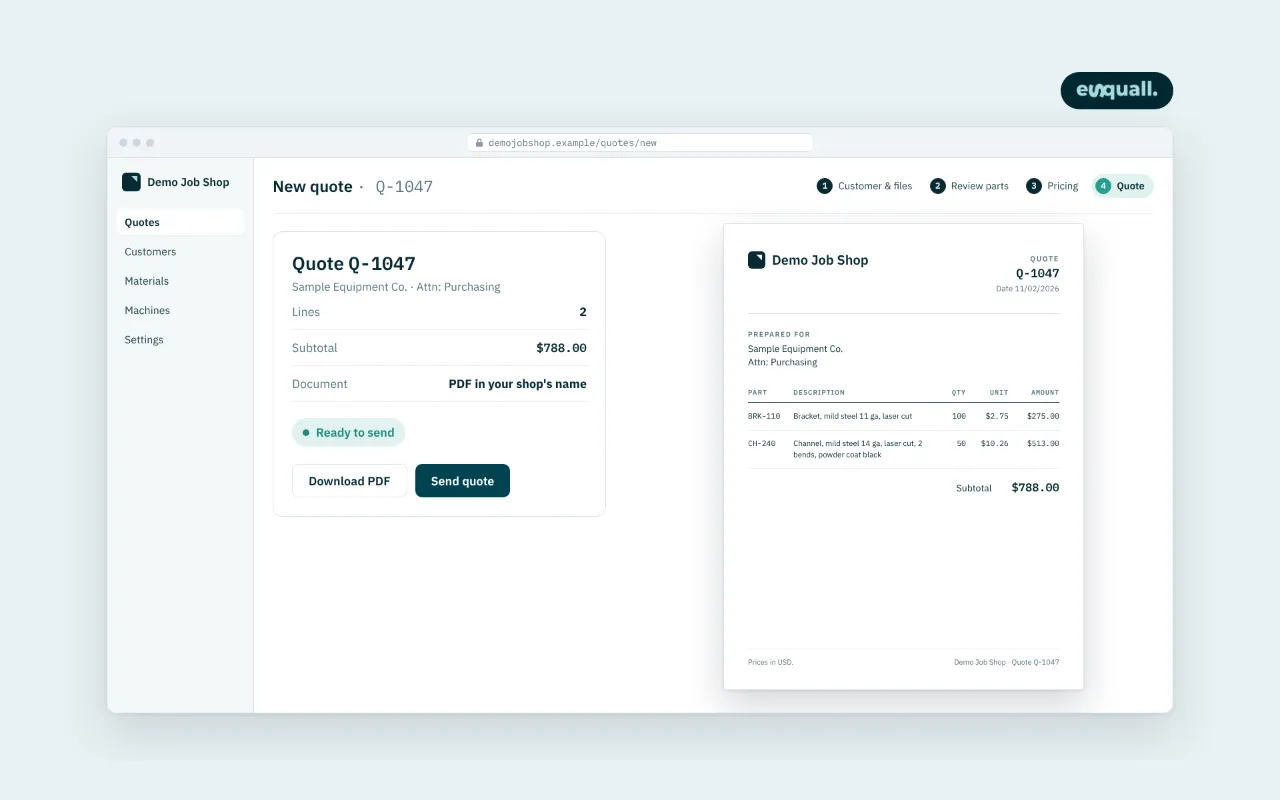
Upload a STEP or DXF, watch the geometry get read, the price built on your own rates, and the quote PDF come out the other end.
90-second walkthrough: upload → geometry read → priced on your rates → quote PDF
Sample output
What the quote document looks like
A three-page internal quote as the system produces it: part and material, per-part cost and price build-up, and the sheet nesting layout. This sample uses a demonstration part (a generic L-bracket) and sample rates, not a customer's quote; the customer-facing PDF carries the same layout without the cost and margin lines.
Download the sample quote (PDF, 3 pages)The problem
Quoting laser-cut and formed parts is where job shops lose jobs and margin
Quotes take days.
The estimator is the bottleneck, and the buyer has already gone with whoever answered first.
The price comes from gut feel.
Cut length, pierces and bends get under-counted by hand, and the job costs more than it was quoted at.
One person holds the knowledge.
When they are out, the shop stops quoting.
How it works
How CAD-to-quote software works: from file to quote PDF in four steps
- Step 1
Upload the file
STEP, DXF or DWG, in the browser.
- Step 2
Geometry is read
Cut length, pierces, bends, holes, material, thickness.
- Step 3
Priced on your rates
Material, machine time, setup, finishing, margin.
- Step 4
Quote PDF in your name
Your estimator checks it and sends it.
Nothing changes in your CAM. Your estimator checks the quote and sends it. See the full walkthrough →
What is included
- STEP, DXF and DWG import
- Geometry extraction: cut length, pierces, bends, holes
- Your material, machine and labour rates
- Quote PDF and quote history
- Multiple users on one shop account
- Works in a browser, no install
Not in this phase: SolidWorks part files, nesting, ERP or scheduling. Nesting and native CAD import were built for the shop in our case study on a vendor cloud service; the product runs on our own geometry engine, so they return as add-ons once the core quoting is proven on your parts.
Works alongside what you already run: the quote is built from the file and your rates, so your CAM, your spreadsheet history and your accounting system stay as they are. Exports to accounting (QuickBooks, Xero) are on the roadmap, not in this phase.
A good fit
- Sheet-metal, laser, plasma, waterjet and press-brake job shops of roughly 1 to 80 people
- Shops that quote many different parts, where one or two estimators price every enquiry
- Shops that want the quote priced on their own rates and checked against their own CAM
Not a fit right now
- Drawings subject to ITAR or EAR (we are not set up for export-controlled work)
- Shops that make the same few parts all year and rarely quote
- A full ERP or scheduling replacement in the first phase
How this compares
Against the ways shops quote today
Each option works for some shops. This is what differs, so you can decide quickly whether a walkthrough is worth your time.
| Spreadsheet or by hand | Quoting module of your CAM | Cloud quoting service | eSquall CAD-to-quote | |
|---|---|---|---|---|
| Who reads the geometry | The estimator, by measuring the drawing | The CAM software, after the part is programmed | The service, from the uploaded file | The system, from the STEP or DXF you upload |
| Whose rates set the price | Yours, in your own cells | Yours, inside the CAM settings | Yours, entered into their pricing model | Yours: material, machine time and labor, entered once |
| How the number is checked | Against memory and past jobs | Against the CAM run itself | Against their reference data | Against your own CAM output during set-up, part by part, before you rely on it |
| Where it runs | Your PC | The CAM workstation | Their cloud | A browser; access to your files limited to named people (see Security) |
| Set-up | None, but every quote is manual | Programming each part first | Account set-up plus rate entry | About ten working days with your rates and sample parts |
| Commercial model | Free, paid in estimator hours | Part of the CAM licence | Monthly subscription per seat or per quote | Agreed per shop before work starts; no per-quote fee |
Built around your shop, not an industry average
Priced on your rates
Your material prices, machine hours and margins, never a benchmark.
Covers the processes you run
Laser, plasma, waterjet, press brake, welding, finishing.
Set up on your past quotes
The first real quote already looks like yours.
Tuned by our engineers
Adjusted when your parts or rates change, at no extra charge during the design-partner period.
Accuracy
234 of 249
checks matched the shop's own CAM software
Tested in October 2026 on 50 of a laser-cutting and bending shop's real parts, five checks each: flat size, cut length, weight, pierce count and parts per sheet, compared with the figures from the shop's own CAM software. A test result on a fixed set of parts, not a live production figure.
Before go-live, your past parts are run through the system and every result is compared with your CAM's numbers. We tune the rules until the agreed target is met, and every later release is checked against your library again.
Read the case studyDesign partners
We are taking on a small number of US shops as design partners through early 2027
What you get
- Set up on your rates within ten working days
- An engineer who tunes it to your parts
- A clear scope agreed before any work starts
- A direct line to the team building it
What we ask
- Twenty past quotes to calibrate against
- A fifteen-minute call each week for the first month
- Honest feedback, and a reference if it works for you